beads-desk

Local-first Web UI for Beads (bd)

Review what your coding agents leave in Beads.

Inspect plans, decisions, Mermaid diagrams, screenshots, diffs, and human questions in your browser while you and your agents keep using bd in the terminal.

Walkthrough of the Now screen, due dates, bottlenecks, an issue blocks graph, an enlarged Mermaid sequence diagram, an attached screenshot, and superseded decisions.

Quick start in any Beads workspace

Install globally with npm
npm install -g @seungyeop-lee/beads-desk
Start local server and open browser
bd-desk start --open

Core Features

Built for reviewing agent work without leaving bd

Every read and edit goes through the bd CLI, and changes made in the terminal appear in open tabs within seconds.

Issues

Browse every issue by work state

Group issues into In progress, Ready, Blocked, Deferred, and Closed tabs, or switch straight to Bottlenecks.

  • Filter by type, label, created or closed date, or No epic only, with direct links to each issue's epic.
  • Search across IDs, titles, descriptions, and comments with inline match locations.
  • Change status and priority directly from the list.
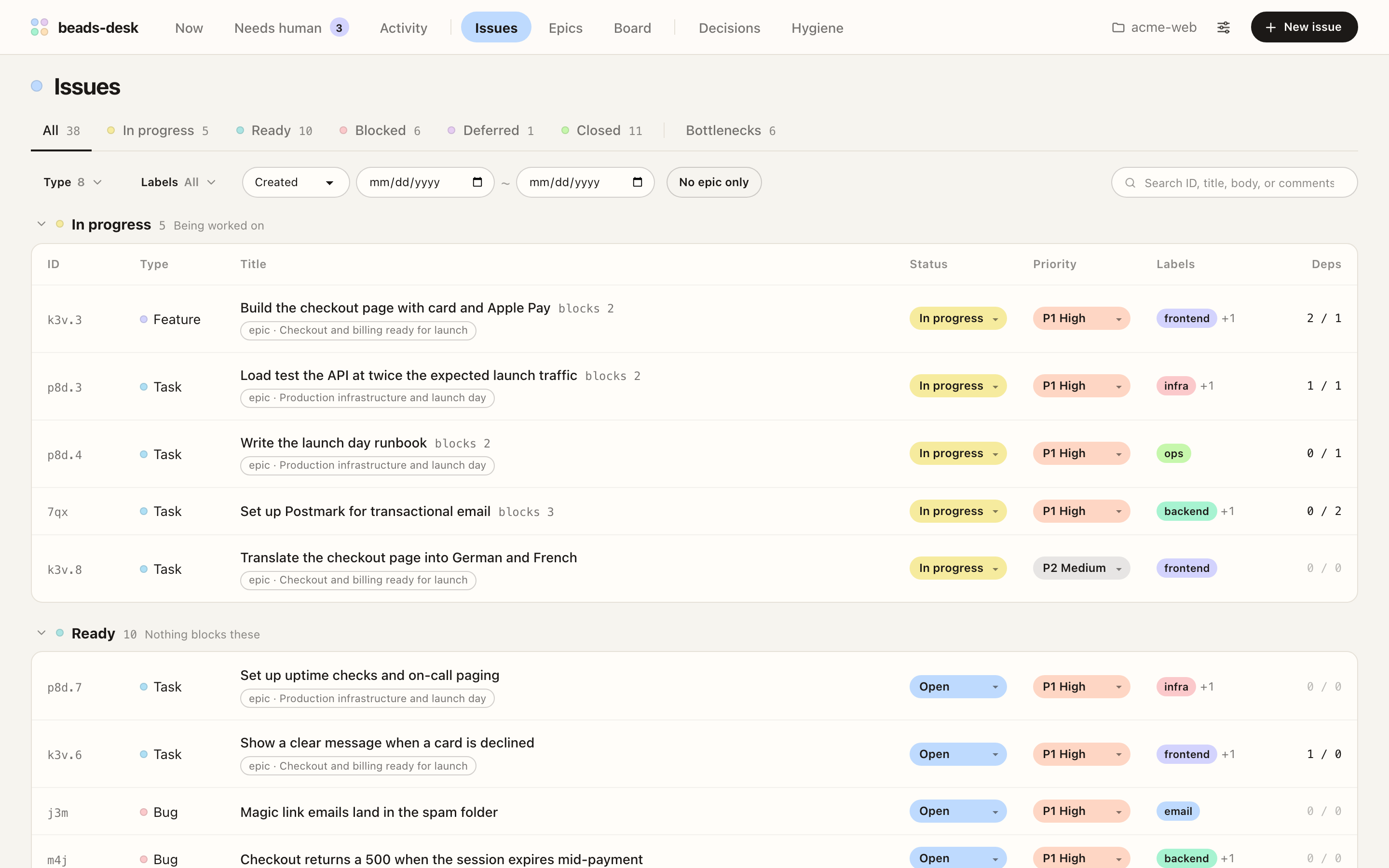
Issues screen grouping all issues by work state, with view tabs, filters, type tags, status and priority chips, and epic links
Issues screen with work-state tabs, filters, and inline status controls

Issues screen with work-state tabs, filters, and inline status controls

Now & Bottlenecks

See what is due and what to unblock next

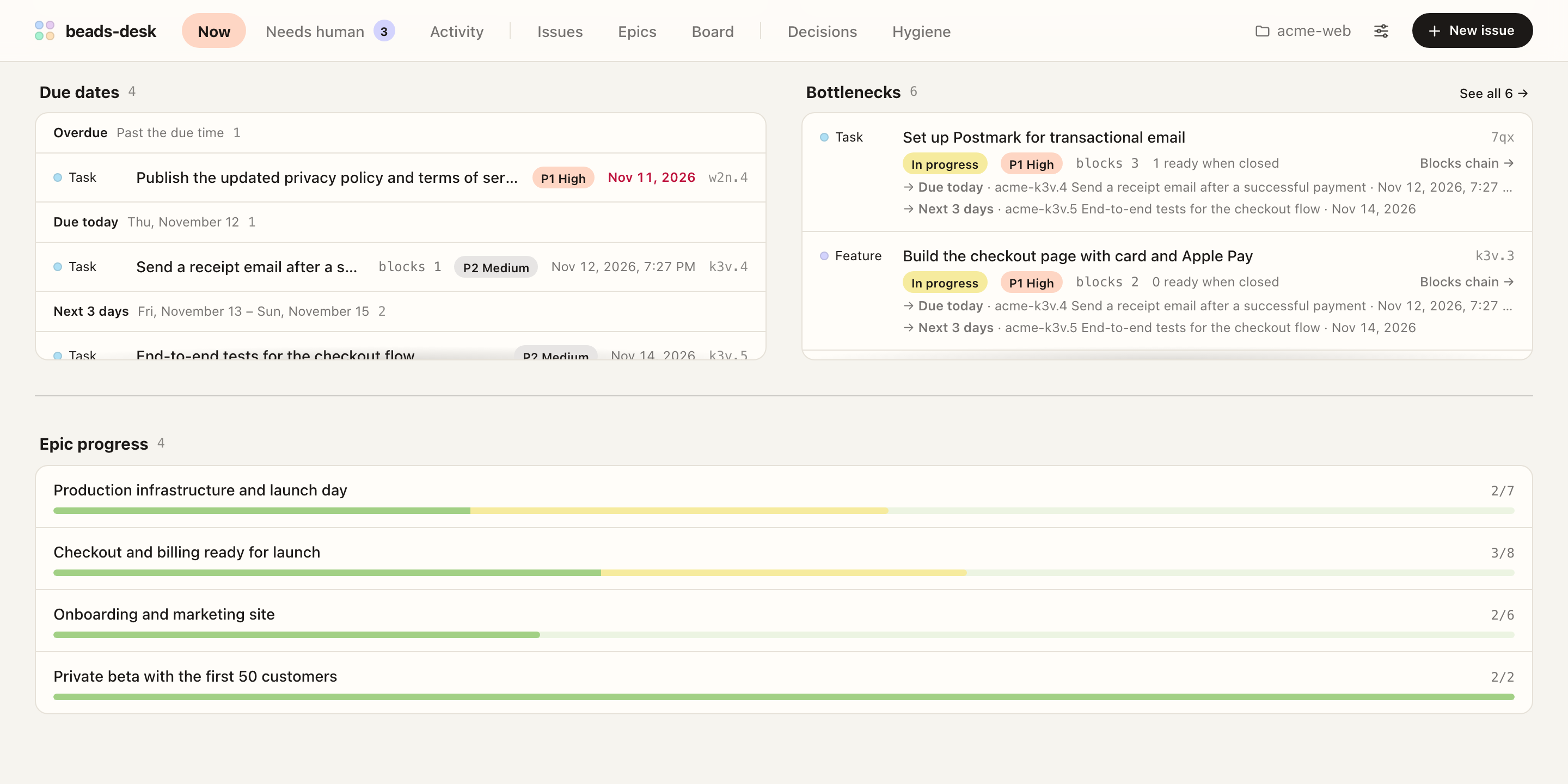
Focus on urgent due dates in Now and rank blocking issues by downstream impact in Bottlenecks.

  • Now groups open issues with due dates into Overdue, Due today, and the next 3 days.
  • Bottlenecks sorts blockers by how many issues wait on them, showing due dates at risk and how many issues become ready upon close.
  • Track in-progress, ready, and blocked counts, a 7-day flow chart, and epic progress bars in one view.
Now screen with due dates grouped into overdue, due today, and the next 3 days, bottlenecks sorted by waiting issues, and epic progress bars
Now screen with due-date buckets, bottlenecks, 7-day chart, and epic progress

Now screen with due-date buckets, bottlenecks, 7-day chart, and epic progress

Graph

Review execution plans stage by stage

Inspect how blocks dependencies divide an epic into stages and where human gates hold the chain.

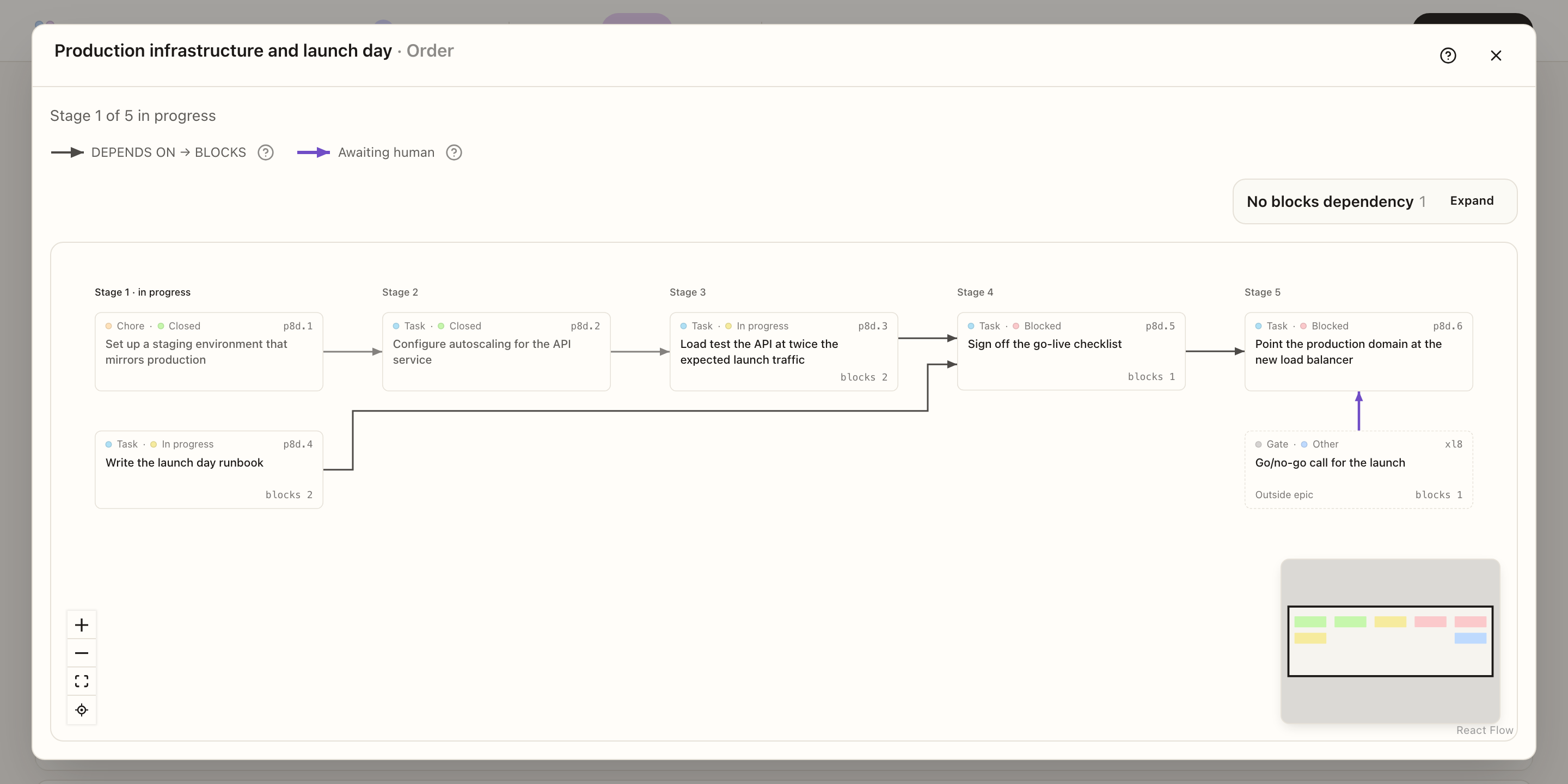
  • View order splits an epic's issues into stages based on blocks dependencies and highlights the active stage.
  • Human gates and external blockers outside the epic appear in the same graph.
  • Open a Blocks graph from any issue to trace upstream and downstream work.
View order graph for an epic arranging its issues into five stages, with a human gate holding the last stage
Stage-by-stage View order graph with cross-epic blockers and human gates

Stage-by-stage View order graph with cross-epic blockers and human gates

Attachments & Diff

Read diagrams, logs, JSON, and diffs inline

Agents attach Markdown notes, Mermaid diagrams, screenshots, recordings, and patch files; inspect them without switching tools.

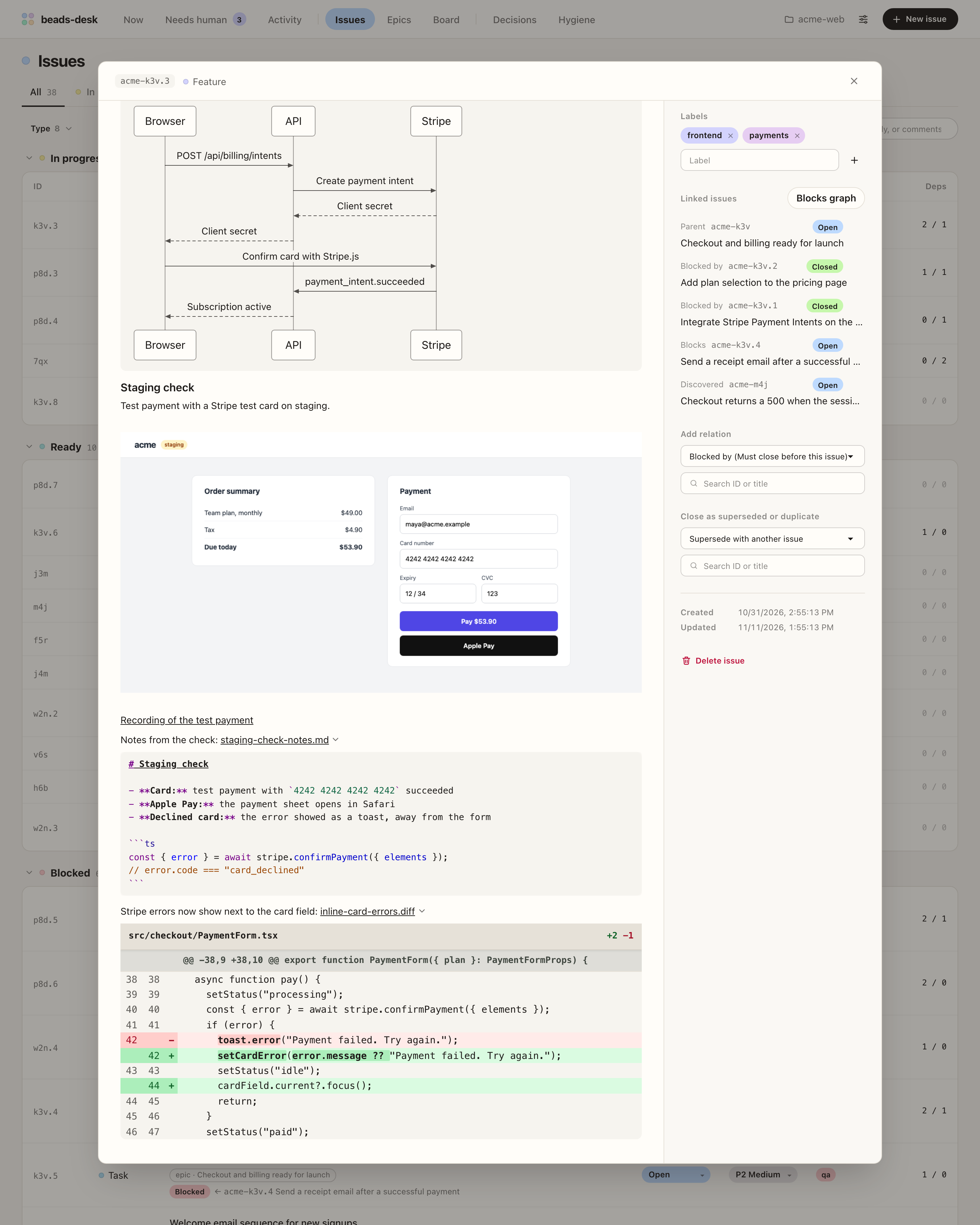
  • Render Markdown and click Mermaid diagrams to enlarge; preview local images and .mp4/.webm recordings inline.
  • Open .md, .txt, .log, .json, and .jsonl links in a dedicated text viewer with Pretty/raw switching, or expand them inline.
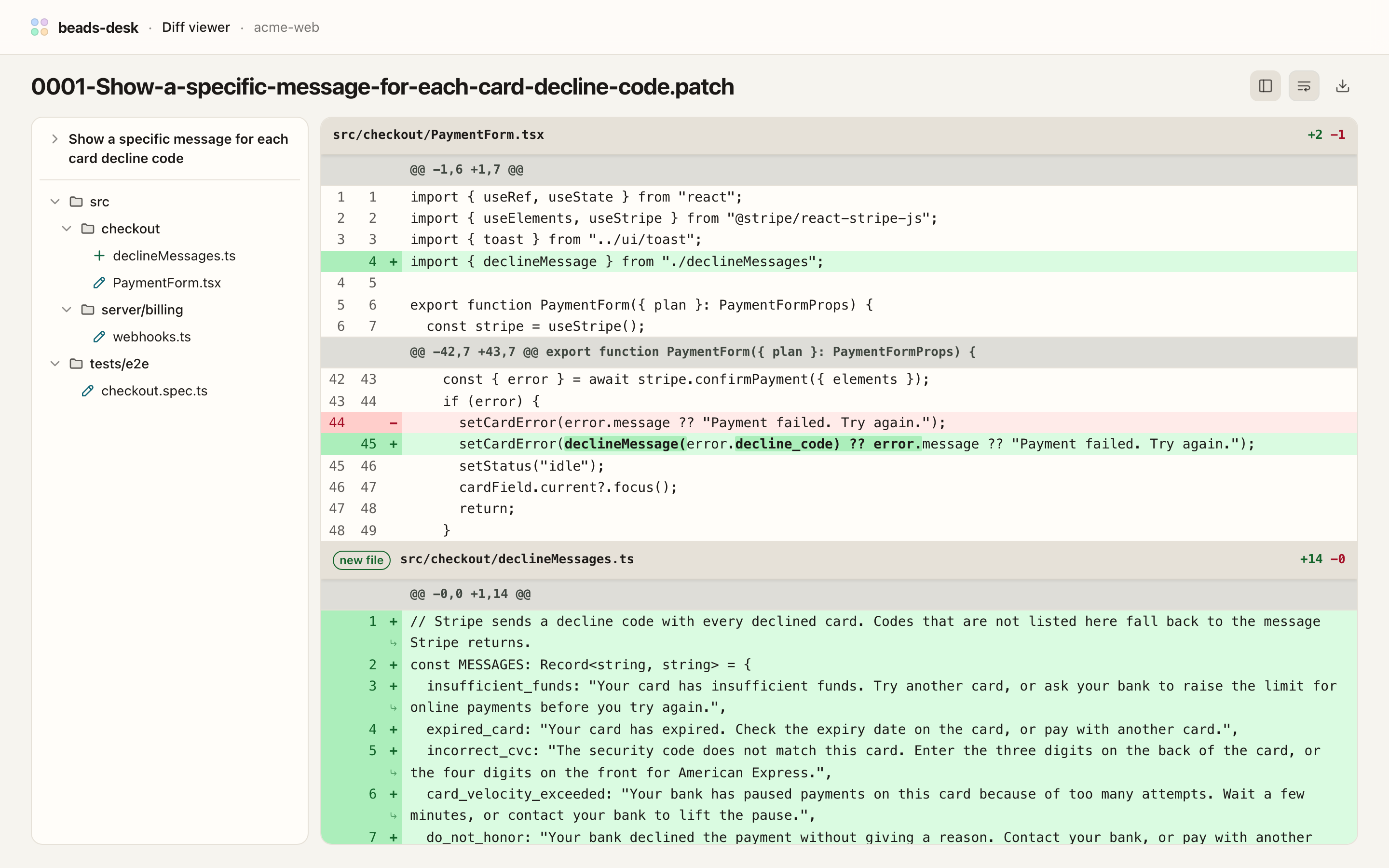
  • Inspect .diff and .patch files with a changed-file tree, wrapped long lines, and word-level change highlights.
Issue detail showing a Mermaid sequence diagram, an attached checkout screenshot, and inline-expanded Markdown note and diff
Mermaid diagram, local screenshot, and inline-expanded note and diff

Mermaid diagram, local screenshot, and inline-expanded note and diff

Diff page for a git format-patch file with a changed-file tree on the left and wrapped diff on the right
Dedicated Diff viewer with changed-file tree and wrapped lines

Dedicated Diff viewer with changed-file tree and wrapped lines

Decisions

Keep architecture decisions on record

Separate decision issues into active and closed lists with clear replacement history.

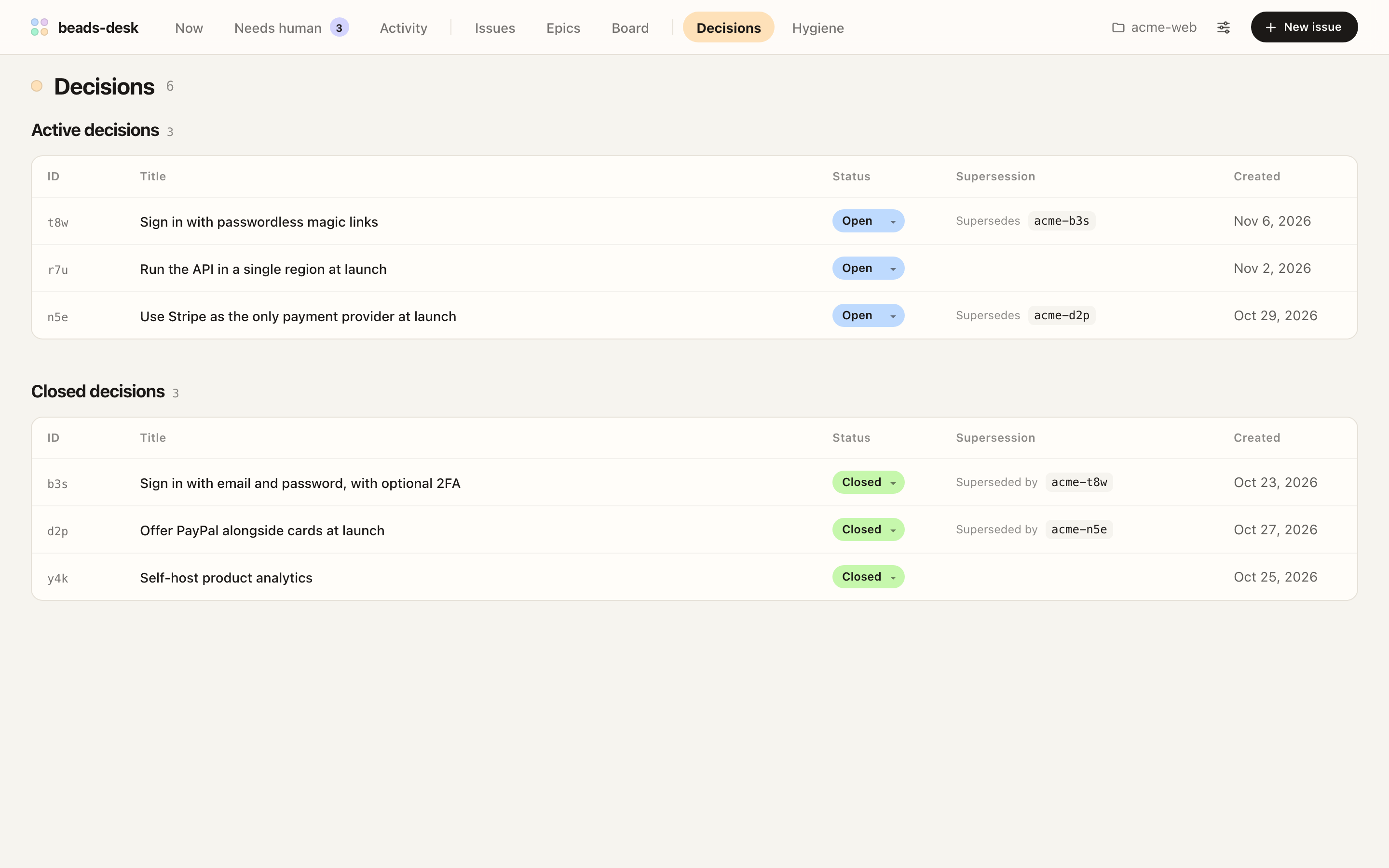
  • Dedicated screen for decision-type issues, divided into active and closed records.
  • Follow supersedes and superseded-by links to see why an earlier decision changed.
Decisions screen splitting active and closed decisions with supersedes and superseded-by links
Decisions screen linking active decisions to superseded records

Decisions screen linking active decisions to superseded records

Needs human

Answer what your agents ask

Collect human-labeled questions and human gates together with the tasks waiting behind each gate.

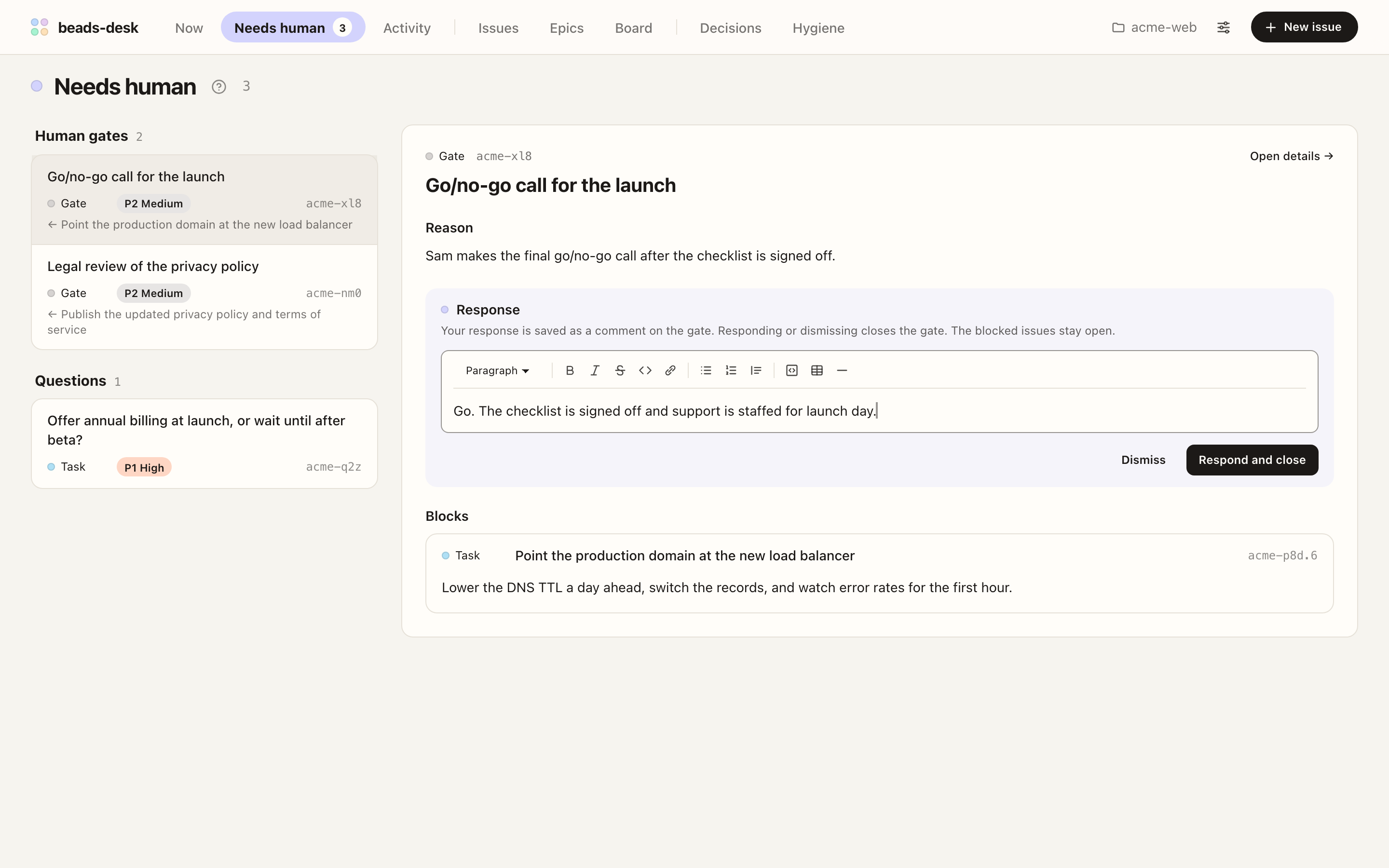
  • See every waiting question and human gate alongside the issues each gate blocks.
  • Respond or dismiss in place to unblock downstream work immediately.
  • Enable browser notifications to get alerted when new human items arrive.
Needs human screen showing a response typed for a selected human gate and the task it blocks
Needs human queue showing the selected gate, response input, and blocked task

Needs human queue showing the selected gate, response input, and blocked task

Activity

Catch up on what happened while you were away

Review a chronological workspace feed of created, closed, commented, edited, and deleted issues.

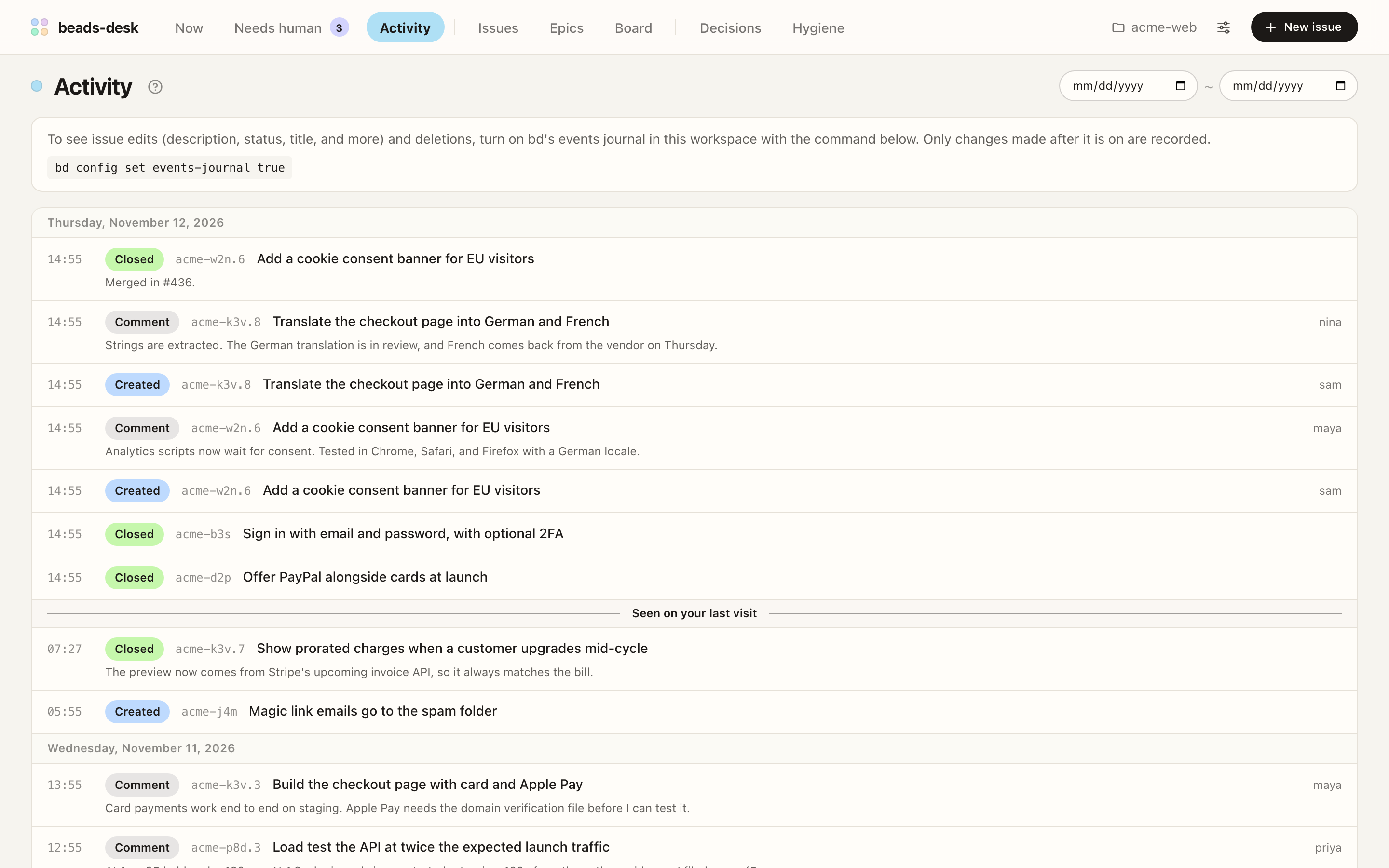
  • Lists issues created, closed, and commented on across the workspace, newest first.
  • Shows field edits and deletions when bd's events journal is enabled (bd config set events-journal true).
  • A Seen on your last visit divider marks exactly where you left off.
Activity screen listing issues created, closed, and commented on today with a Seen on your last visit divider
Activity feed with Seen on your last visit marker

Activity feed with Seen on your last visit marker

Hygiene

Keep the tracker tidy

Surface stale issues, commit mentions left open, missing recommended sections, duplicates, and closable epics.

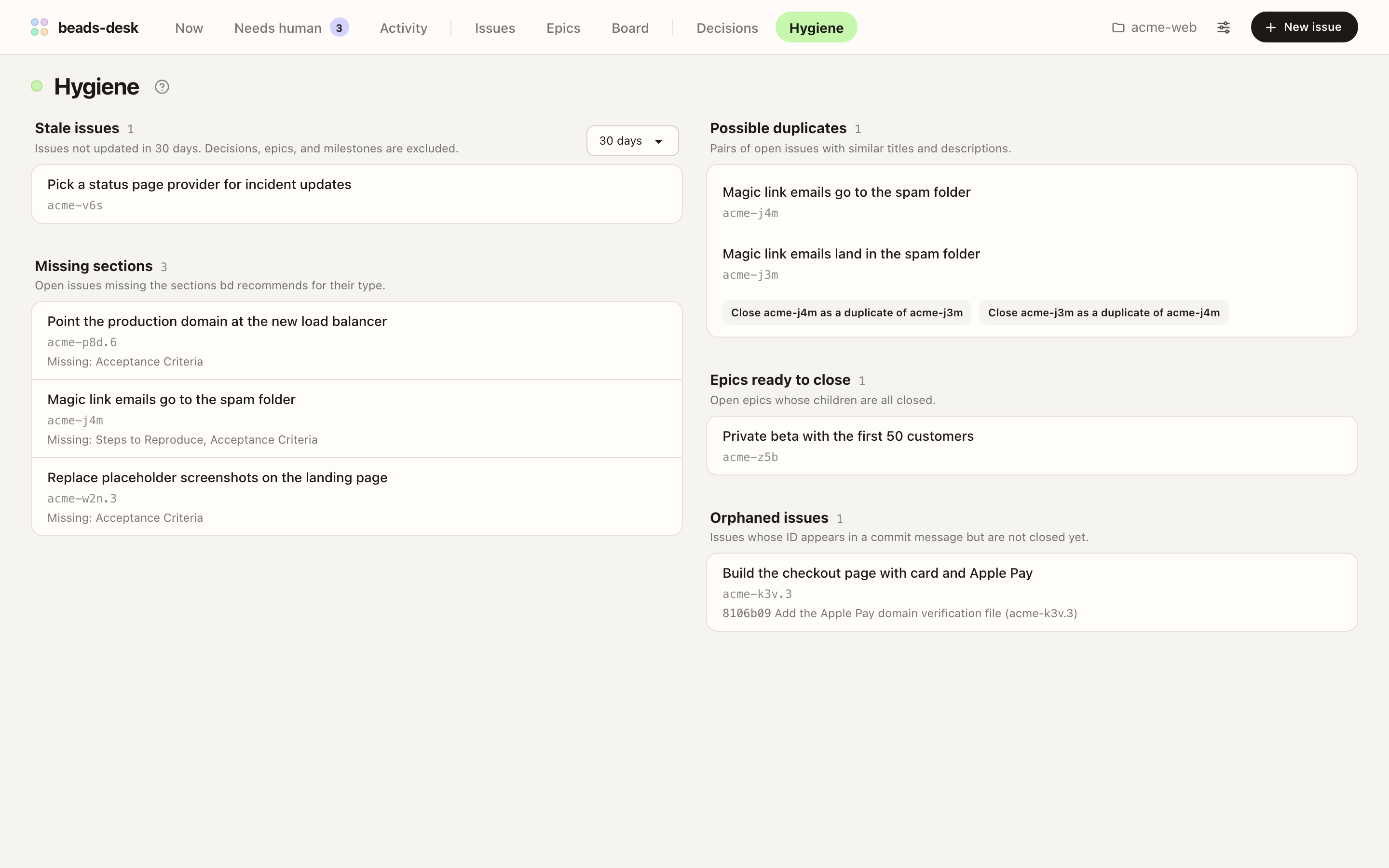
  • Detects stale issues, open issues referenced in commits, and issues missing bd-recommended sections.
  • Finds possible duplicates and lets you close a duplicate directly from the screen.
  • Highlights epics whose children are all closed and ready to wrap up.
Hygiene screen showing stale issues, possible duplicates, missing sections, epics ready to close, and orphaned issues
Hygiene audit screen for stale, duplicate, and ready-to-close items

Hygiene audit screen for stale, duplicate, and ready-to-close items

Also in beads-desk

  • Epics & Board

    Browse open and closed epics with progress bars, or drag cards across columns on the Board to update status.

  • Side panel

    Open a linked issue beside the one you are currently reading without losing your place.

  • Multi-workspace tabs

    Open a different bd workspace in each browser tab against a single local server.

  • 3 languages & 2 themes

    Switch between English, Korean, and Japanese UI, and light or dark themes in Settings.

Requirements

Runs locally alongside your bd workflow

Operating system
macOS, Linux, or Windows. Tested with bd 1.3.1 on macOS and GitHub Actions windows-latest.
Node.js
Node.js 22 or later.
bd CLI
The bd binary on PATH, or pass its path via BD_BIN (npm-installed bd on Windows is detected automatically).
Beads workspace
Any directory initialized with bd init.

Getting Started

Install once and launch in any workspace

The daemon listens only on 127.0.0.1, opens the active workspace in your browser, and keeps running in the background.

  1. 01

    Install the package globally

    Install with npm or pnpm.

    npm
    npm install -g @seungyeop-lee/beads-desk
    pnpm
    pnpm add -g @seungyeop-lee/beads-desk

    If you have never installed a global package with pnpm, run pnpm setup once and open a new shell first.

  2. 02

    Start the server in your workspace

    Run bd-desk from a Beads workspace root or any of its subdirectories to register it and open the UI.

    CLI
    bd-desk start --open

Managing the server

Stopbd-desk stop
Stops the background server.
Updatebd-desk restart
Run the install command again, then restart the server.
Full guide
See USAGE.md for options, multiple workspaces, browser notifications, local file links, and troubleshooting.